Internal Wiki Tools Compared for Remote Startup Teams
Notion dominates early stages, but Confluence, Slab, and Slite each solve specific scaling problems.

Most remote startup founders figure out their knowledge system is broken the same way. A new hire asks a question. The answer lives in a Slack thread from four months ago, or in the founder's head, or in a Google Doc that three people have edited into an unrecognizable mess. Nobody can find it. Someone spends an hour digging. The founder answers it themselves. Again.
This happens around hire three or four. That is earlier than most founders expect, and it compounds fast. According to data from April 2026, the average SaaS team loses 9.3 hours per employee per week searching for information that already exists. At five people, that is more than 46 hours a week. Burned. On stuff that should already be written down somewhere findable.
Remote teams feel this harder. There is no hallway. No ambient awareness of what your teammates decided yesterday. Async work across time zones demands that decisions, processes, and context are actually written down and actually findable. Not just theoretically stored in a folder somewhere. And when someone leaves early (which they do), they take whatever lived in their head with them.
The tool market has plenty of answers. The trick is matching the answer to where your team actually is right now.
What a startup actually needs from a wiki tool at each early stage
Before comparing tools, it helps to be honest about what a wiki has to do. The core jobs are not complicated:
- Be the single source of truth for processes, decisions, and institutional knowledge
- Be async-first. Information should be findable without having to ask a person
- Be low friction to write and update. If contributing is annoying, nobody will
- Support onboarding. New hires should be able to self-serve the basics on day one
What you need from a wiki changes as you grow.
Solo founder or co-founder pair: Almost any tool works. The habit of writing things down matters more than which software you pick.
Three to ten people (first hires, early product build): You need flexibility and low overhead. Governance can wait. Structure cannot. New team members need to find things.
Ten to twenty people (team expanding, processes solidifying): Search quality starts to matter. Cross-tool findability becomes real. Someone needs to own whether content is still accurate.
Twenty-plus: Organization at scale, permissions, analytics, and content staleness all become genuine problems worth solving with the right tool.
There are also criteria that actually move the needle for early-stage selection:
- Cost at small team size. Many tools have minimums or per-user pricing that punish tiny teams.
- Ease of adoption for non-technical teammates. If it requires a learning curve, most people will not climb it.
- Flexibility vs. structure. Some tools reward investment in learning. Others are plug-and-play.
- Integration with tools already in use. Slack, Google Workspace, GitHub. If the wiki is isolated, it gets ignored.
- Whether AI features are gated. Several tools have moved AI behind expensive tiers. Know before you commit.
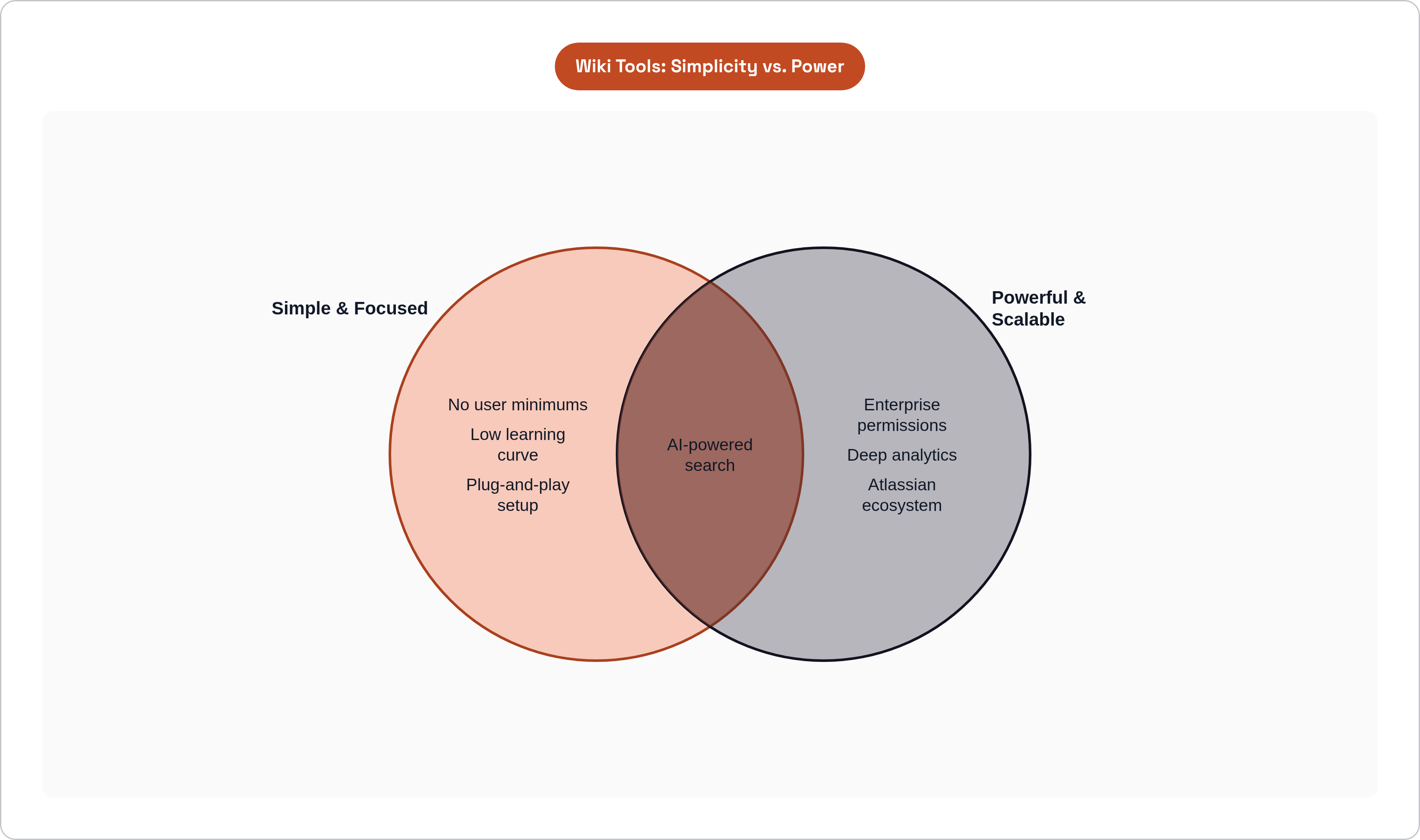
What early-stage teams do not yet need: enterprise permissions architecture, deep analytics, compliance audit trails. These are real needs at scale. They are expensive distractions before you get there.
Notion: the default starting point and when it earns that status
Notion became the default startup wiki for real reasons. The block-based editor handles docs, databases, and wikis inside one interface. Non-technical teammates actually adopt it. The friction to create a page or embed a database is genuinely low. According to data from May 2026, approximately four million teams use it. That number is not an accident.
The free tier covers most wiki needs for teams under 20. That is a real advantage at the earliest stage, when every dollar is accounted for.
The pricing shift worth knowing about
In May 2025, Notion moved AI behind its Business plan at $20 per user per month. It had previously been an $8 add-on. Small teams that had budgeted around AI features saw their bills roughly double. At 20 users on annual billing, Notion Plus runs about $200 per month. That is competitive but not the cheapest option in this class.
The real risk: entropy
The bigger problem with Notion is not price. It is chaos. Without naming conventions and page hierarchy set up early, a 30-person team will have three versions of every document by month six. That is not speculation. Teams run into this constantly.
Notion requires governance. Build structure before you need it. Not after. There is no native content verification, so outdated docs sit there indefinitely with nothing prompting anyone to update them. Search quality also degrades as documentation volume grows, which becomes a meaningful problem somewhere between 20 and 50 employees.
Honest verdict: Notion is best for teams under 20 where the flexibility-to-overhead ratio is highest. The point to re-evaluate is when documentation volume outgrows informal navigation and no one can find anything reliably anymore.
Confluence: when it fits a startup and the real reasons most should wait
Confluence is built for a different problem than most startups have. It scales to thousands of users with permissions, spaces, and governance infrastructure that smaller tools simply do not attempt. If your team is already deep in the Atlassian ecosystem (Jira, Bitbucket), Confluence is the natural gravity. Rovo AI is now bundled into all paid plans at no extra cost, which is a meaningful differentiator.
The friction is real
The interface is heavier than a startup needs. Sixty-six separate mentions of "slow performance" in G2 reviews is not a rounding error. That is a pattern. Atlassian's October 2025 price increase pushed some customers from $150,000 to $500,000 per year over three years. That trajectory matters even for small teams thinking about long-term cost.
The per-user Marketplace app billing adds costs that are not obvious at signup. Confluence Cloud Standard looks competitive at roughly $5.42 per user per month on annual billing, but the jump to the Premium tier at around $10.44 per user per month for analytics and whiteboards surprises teams who did not budget for it.
When it actually makes sense
Confluence is the right call for teams that are Jira-native from day one, or for technical co-founder teams that want a wiki they will not need to migrate at Series A. For everyone else, the learning curve and the weight of the tool consume early-team bandwidth that is better spent on product.
Slab, Slite, and Nuclino: focused tools built around findability and simplicity
Slab: the unified search layer
Slab's signature feature is cross-platform search. It queries Slab content alongside Slack, Google Drive, and Notion simultaneously. No migration required. For teams drowning in five knowledge silos, Slab is a single search surface without a painful consolidation project.
The free tier covers up to 10 users. The standard tier runs $6.67 per user per month. At 20 users on annual billing, the Startup plan comes in around $160 per month. Slab fits growth-stage teams of 20-plus where documentation volume has grown beyond what informal navigation can handle.
Slite: distraction-free with content verification baked in
Slite has two features that set it apart from Notion at the same price point. The AI-powered Ask feature lets teammates query the knowledge base conversationally instead of hunting through docs. And document verification lets you set validity periods so content does not go stale silently. An analytics dashboard surfaces what the team reads and searches, which helps identify knowledge gaps before they cause real problems.
Standard tier is $6.67 per user per month with no user minimums. That last part matters a lot for very small teams. The caveat is that heavy AI usage pushes you toward higher-tier plans, so the cost scales with how much you lean on it.
Nuclino: minimal by design
Nuclino is deliberately simple. No database views, no task management, no complex formulas. The graph view displays knowledge relationships as an interconnected network, which is genuinely useful for founders mapping how product areas, processes, and decisions connect to each other.
Starter tier is $6 per user per month. AI is gated behind the Business tier at $10 per user per month. No user minimums. Nuclino works best for small teams of five to fifty who want a fast, focused wiki with almost no learning curve. If your team will not spend time learning a tool, this is worth a serious look.
Coda, Guru, and Tettra: when the wiki needs to do more than store documents
Coda: the wiki-as-app-builder
Coda sits at a different point on the spectrum. It combines documents with powerful tables and automations. If your documentation needs structured data, decision logs, onboarding trackers, or interactive elements, Coda handles that in ways Notion struggles to match.
The pricing model is genuinely interesting for mixed teams. Viewers are free. Only doc makers pay, at $10 per user per month on the Pro tier. If your team has five power users and 25 readers, the effective cost is meaningfully lower than per-seat alternatives.
The downside is real, though. Coda is not plug-and-play. It rewards teams that invest in learning the formula system. The mobile app is the most-cited pain point across community forums, described as "horrendous" by multiple users. This is a tool for technical teams or ops-heavy startups that will genuinely use the automation layer, not for teams looking for something to set up in an afternoon.
Guru: knowledge delivery where work actually happens
Guru's model is different from every other tool in this comparison. Instead of a wiki you visit, Guru delivers answers inside the tools you already use. The browser extension and integrations surface answers inside Salesforce, Zendesk, and Slack without a context switch.
The cards and collections model includes mandatory verification. Content owners are prompted on a schedule to confirm or update their material. AI flags docs that contradict newer information. For startups with a customer-facing team or support function that needs accurate, always-current answers, this solves a real problem that Notion and Coda leave open. Guru starts at $5 per user per month as of 2025.
Tettra: Slack-native for teams that live in Slack
If your team lives in Slack and the biggest friction is switching to a different tool just to find an answer, Tettra is designed for that problem specifically. The AI bot Kai delivers answers directly in Slack channels and DMs, pulling from connected Google Workspace files and historical Slack conversations.
Content verification assigns page owners and flags outdated docs. That accountability is something Notion lacks out of the box.
The catch is a pricing trap worth knowing about upfront. All Tettra plans require a 10-user minimum. A team of four pays for 10 seats. That means the effective per-user cost is significantly higher than the listed price until you hit that threshold. Tettra works best for Slack-first remote teams of ten or more.
How the tools stack up on price at the team sizes that actually matter for early startups
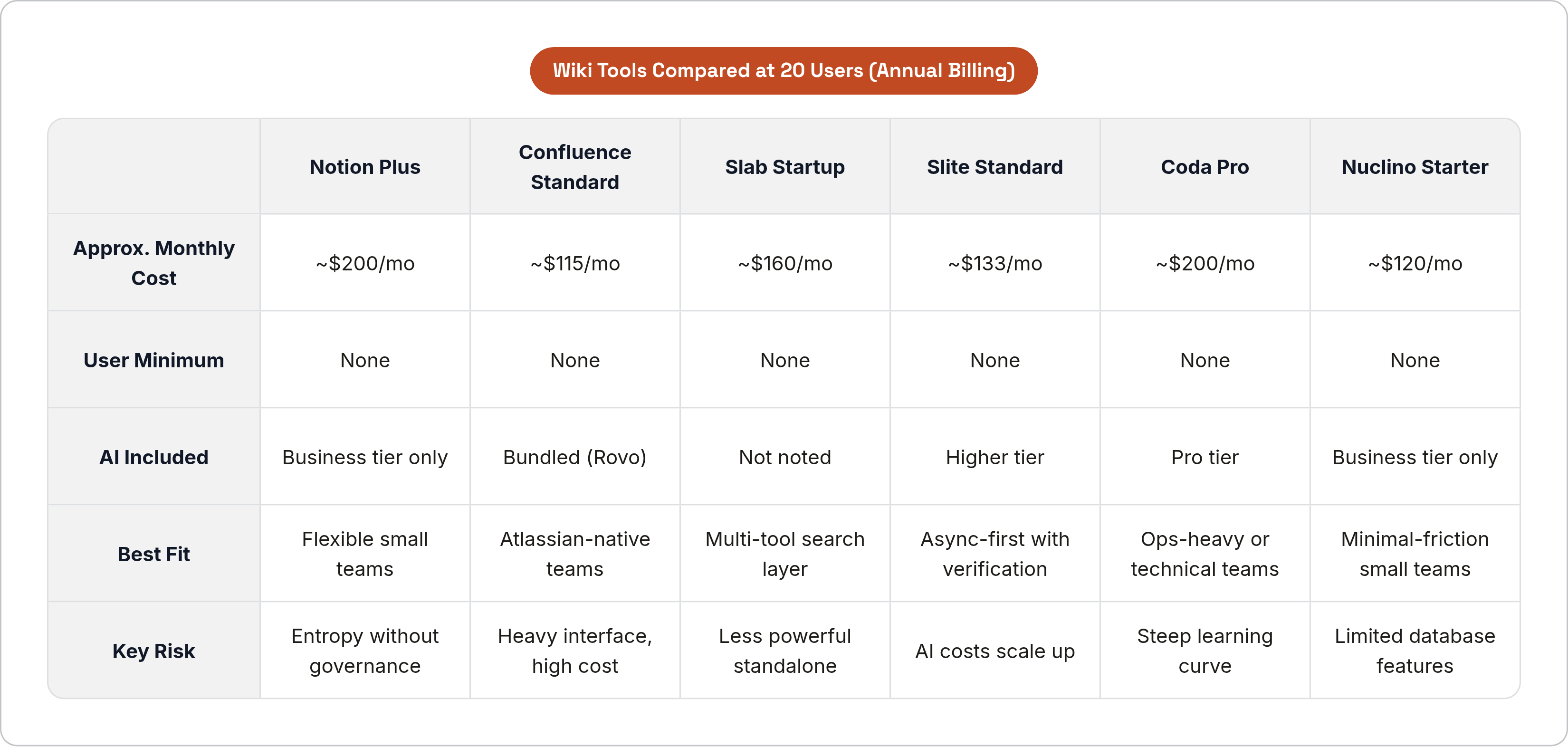
At 20 users on annual billing, here is how the main options line up (figures per April 2026 data):
- Confluence Standard: approximately $115 per month
- Slab Startup: approximately $160 per month
- Notion Plus: approximately $200 per month
- Coda Pro: approximately $200 per month
Pricing traps worth naming out loud
- Tettra's 10-user minimum means a 4-person team pays the same as a 10-person team. Not obvious until you hit the checkout screen.
- Notion's AI gate means full AI now requires the Business plan at $20 per user per month. If AI features were part of your planning, budget accordingly.
- Coda's viewer-free model inverts the math for large read-mostly teams. Fewer doc makers equals lower effective cost. Worth modeling before ruling it out.
- Slite and Nuclino have no user minimums, which is a real advantage for two-to-five person teams in their first months.
The frame that matters most for early-stage founders is not just monthly spend. It is the cost of switching. Migrating a messy Notion workspace to Slab at 25 people is a real time cost. Building structure early in whichever tool you choose is cheaper than rebuilding it later in a different one.
Matching the right tool to where the team is right now
Pre-launch or solo founder / co-founder pair
The documentation habit matters more than the tool at this stage. Notion's free tier or Nuclino Starter is plenty. Low cost, low friction, set up in an afternoon. The goal is to capture decisions, early process, and context that future hires will need, not to build a comprehensive knowledge system yet. You are planting seeds, not building a library.
First hires, three to ten people, fast iteration
This is where the choice actually starts to matter. Notion's free tier still works, but set up structure before you feel like you need it. Define where different types of documentation live. Name things consistently. If the team is Slack-native and likely to stay that way, Tettra is worth evaluating now. If knowledge is scattered across multiple tools already, Slab's unified search is worth a hard look even at small team size.
Slite and Nuclino both shine here. No minimums, simple interfaces, and verification features that push Notion out of the running if content accuracy is important to you.
Ten to twenty people, processes solidifying
This is where Notion either proves it can hold the weight or starts to crack. If your workspace is clean and well-governed, stay. If search is failing and nobody trusts whether a doc is current, this is the moment to move before the cost of switching gets any higher.
Slab, Slite, and Guru all become stronger fits here. If your team is customer-facing and documentation accuracy is tied to customer outcomes, Guru's verification model earns its keep. If the team is ops-heavy and your documentation needs to do structured work, Coda is worth the learning curve.
Twenty-plus people
At this stage, the search problem is real. The content staleness problem is real. The onboarding problem is real. Notion can still work with genuine investment in governance. Slab's unified search becomes a strong value proposition. Guru and Tettra both earn their complexity at this team size.
If you have been Atlassian-native from the beginning, Confluence is finally pulling its weight. If you are not in the Jira ecosystem already, this is still probably not the moment to start.
The through-line across all of this is simple. Pick a tool that matches where you are right now, not where you hope to be in two years. Set up structure early. Write things down. The best wiki is the one your team actually uses.


